New in the CoreDash family · pump-station SCADA

Every pump station,
seen and controlled
from anywhere

CoreDash HydroLink is web and mobile SCADA for water pump stations: PID pressure control, automatic pump alternation, alerts to LINE, and a REST API for your other systems, with nothing to install.
PID steady pressure Lead/Lag auto alternation Modbus TCP · RTU · MQTT AES-256 API
coredashtech.com/hydrolink/app
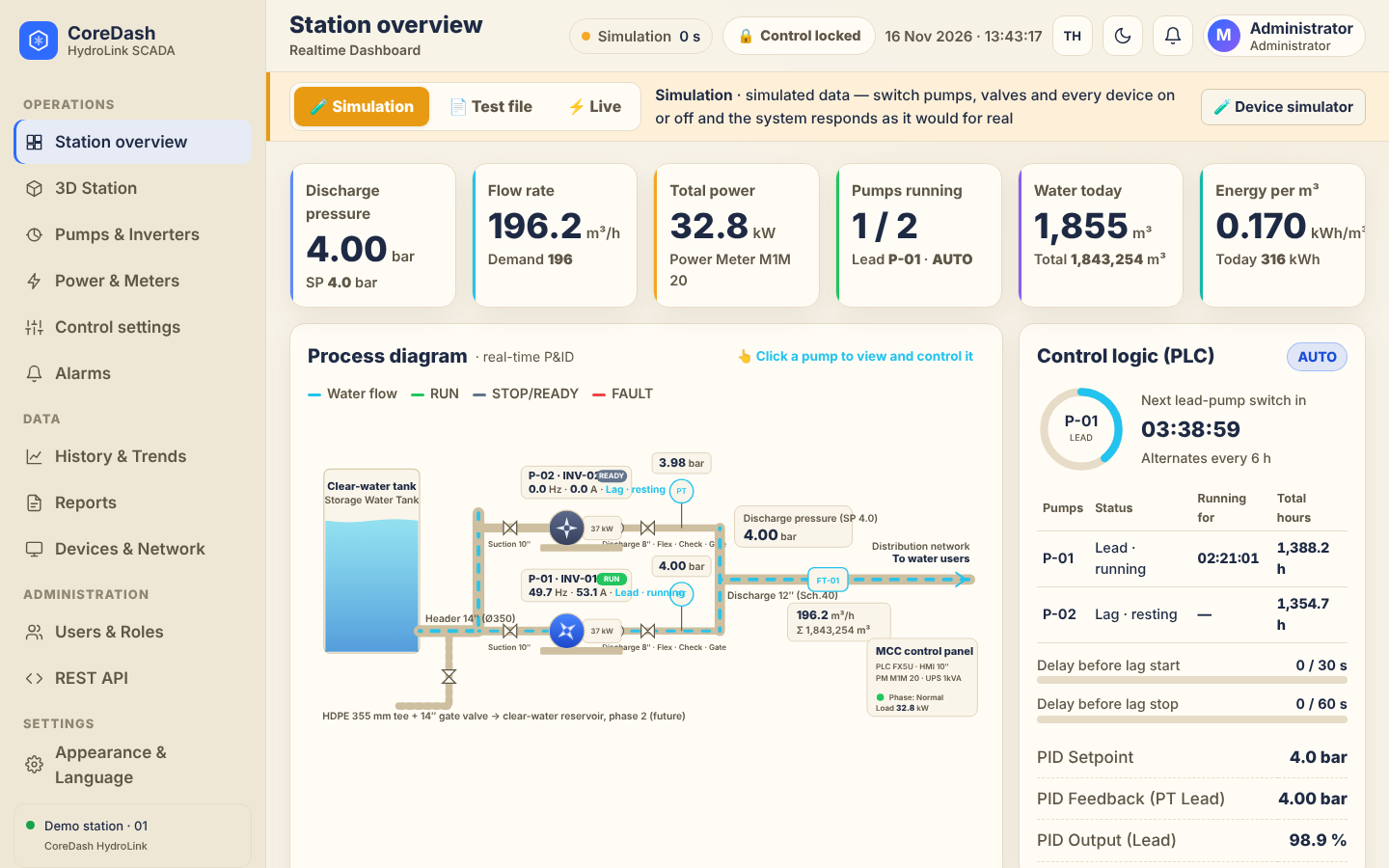
Station overview: live P&ID, pressure, flow and control logic
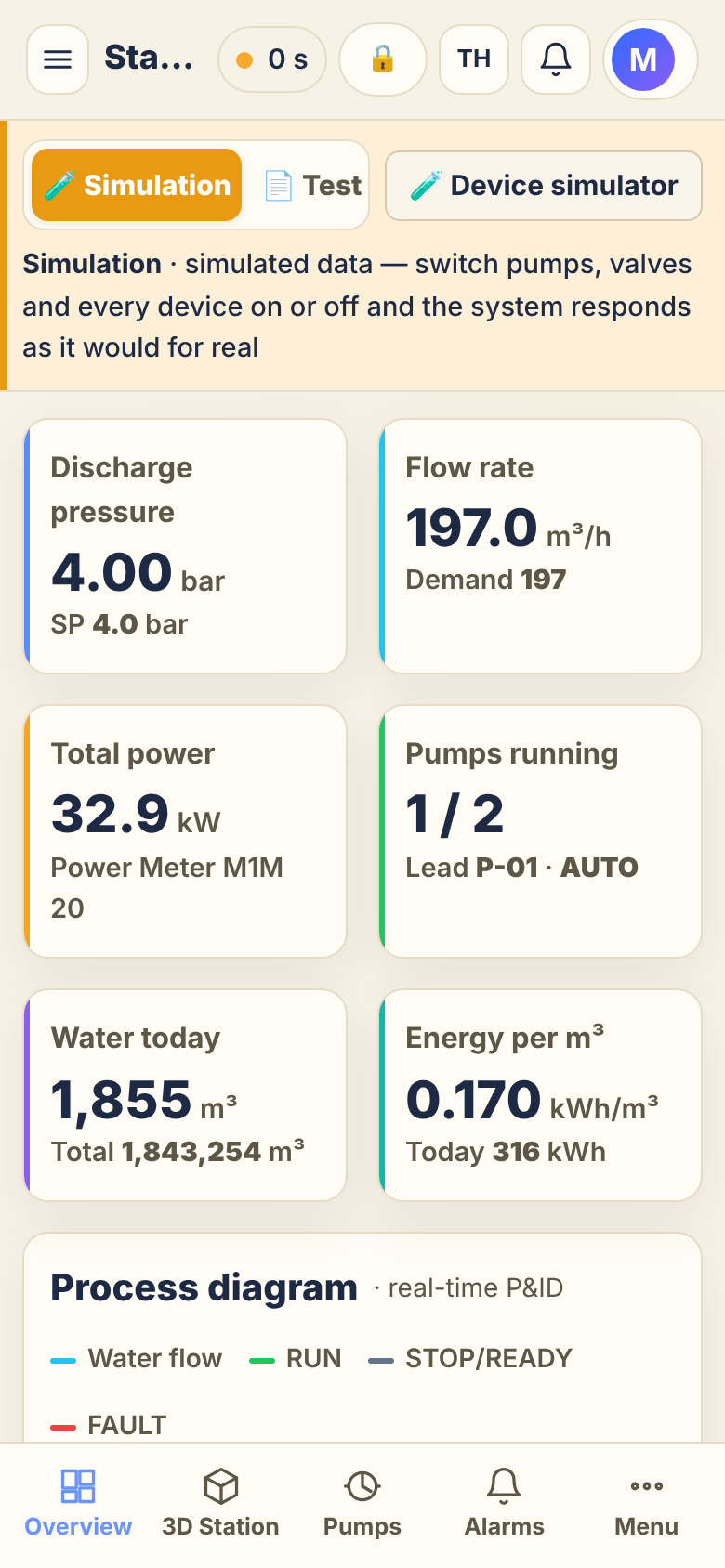
Mobile screen
Discharge pressure · live 4.00bar
Works with Modbus TCP / RTUMQTTPLC FX5UACS580 VSDPower MeterFlowmeterLINE OATelegramSMTP
Features

Everything a pump station needs, from the panel to the boardroom

Shaped by how operators and water engineers actually work: easy to read on a phone, safe to command, and every action traceable.

PID pressure control

Inverter speed is trimmed automatically to hold the pressure set-point, using less energy than throttling and reducing water hammer.

Automatic lead / lag alternation

Duty pump rotates on a timer, the assist pump starts when pressure cannot be held, with a live countdown and run hours per pump.

PIN-protected commands

Click a pump on the P&ID to open its faceplate, unlock with a personal PIN, confirm every command, and every action lands in the audit log.

Instant alerts

Alarms go to LINE OA, Telegram and email by severity, with acknowledgement and a full history.

History, trends and reports

Trends for every point, daily and monthly reports on volume and kWh/m³, CSV export and printable PDF.

Open REST API

Plug into ERP, BI or BMS straight away: OpenAPI spec, scoped API keys, rate limits and AES-256 encryption.

How it works

From the pump panel to your phone in seconds

Control logic always stays in the on-site PLC. HydroLink reads it through the CoreDash Edge Gateway and publishes it securely to the web.

FIELD Pumps + VSD ×2Pressure sensorsFlowmeterPower MeterTank level PLCPID · lead/lag Edge Gatewaypolls every 1 sbuffers when offline HydroLinkHTTPS · REST · AES-256 Web & mobile LINE · Telegram · Email ERP · BI · BMS I/OModbusTLS
01 · SIMULATETry it in the browserA process simulator behaves like a real station: command pumps, change set-points, watch the alternation.
02 · TEST FILEReplay events from JSONUpload scenario files — pump trip, power loss, peak demand — to test alerts before go-live.
03 · LIVEConnect the edge gatewayInstall the gateway in the panel, enter its URL and API key, and the same screens switch to live data.
Screens

Every screen your team will use

Overview

Live P&ID · KPIs · control logic

Security

Remote control, with certainty every time

  • Three roles: viewer · operator · admin
  • Personal PIN unlocks commands for 5 minutes, then auto-locks
  • Confirm before every command; the audit log records who did what, when
  • Interlocks block unsafe sequences; core logic always stays in the PLC
  • HTTPS · scoped API keys · rate limits · AES-256-GCM encryption
Built for

Anywhere pumps need looking after

Village & municipal waterSupply stations and elevated tanks, many sites on one screen
Industrial estates & plantsProcess water, fire water, boosters and cooling water
High-rise, condos, hospitalsBooster sets that must hold pressure 24/7
Irrigation & farmsScheduled pumping with alerts when something is off
FAQ

Before you start

Does it work with other PLC and inverter brands?

Yes. HydroLink reads Modbus TCP / RTU and MQTT through the CoreDash Edge Gateway; you only edit the register map in the config file. The demo uses a Mitsubishi FX5U PLC and ABB ACS580 inverters.

What happens if the internet goes down?

The pumps keep running: control logic lives in the on-site PLC, and the gateway buffers data locally until the link is back.

Can we try it before installing anything?

Three ways: the in-browser simulator, uploading JSON test files that replay events (pump trip, power loss), and connecting a real gateway when ready.

How is the data protected?

HTTPS everywhere, three user roles, a PIN for commands, an audit log of every action, and optional AES-256-GCM encryption on API payloads.

Want to see your station on this screen?

Open the demo now, or talk to the team about your site and register map.